在使用 Mermaid 繪製圖表時,我習慣透過自定義顏色來強調圖例。然而,在 Obsidian 1.8 版本更新後,發現 Mermaid 圖表的顏色呈現與預期不符。根據 論壇討論,開發團隊為了降低維護成本,改用 CSS 來處理深淺色主題的適配,不再逐一調整 Mermaid 的顏色設定。雖然這種方案較為簡便,但也使得顏色的精確控制變得更具挑戰性。
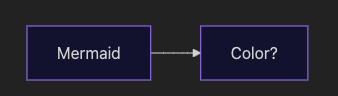 原本在深色模式會是預設淺色的 mermaid diagram,
在這次的改動中會變成深色,並隨著模式切換透過 filter 做顏色轉換。
Obsidian 目前採用的解決方案是使用 CSS filter 來處理顏色轉換。具體來說,在深色模式下會套用以下 CSS:
1
2
3
| .theme-dark .mermaid > svg {
filter: invert(100%) hue-rotate(180deg) saturate(1.25);
}
|
CSS color inversion and hue rotation.
如果想要保持原有的顏色呈現,可以在 obsidian css snippet 中加入設定來取消 filter 效果。
- 在
.obsidian\snippets 中新增
 1
 2
 3
 4
 5
 6
 7
 8
 9
10
11
12
13
14
15
16
17
18
19
| .theme-dark .mermaid > svg {
filter: none;
}
.theme-dark .mermaid > svg .edge path,
.theme-dark .mermaid > svg .edgePath path,
.theme-dark .mermaid > svg .edgePaths path,
.theme-dark .mermaid > svg line,
.theme-dark .mermaid > svg .link {
stroke: #ddd !important;
stroke-width: 2px !important;
}
.theme-dark .mermaid > svg marker path,
.theme-dark .mermaid > svg .marker path,
.theme-dark .mermaid > svg .arrowheadPath {
stroke: #ddd !important;
fill: #ddd !important;
}
|
- 在
Settings -> Appearance -> CSS snippets 中啟用剛剛新增的 css 樣式
Reference
Mermaid.js diagram colors are now broken since update 1.8.3